Lights Out
A puzzle that aims to turn off all the lights (lights out).
You can play 3x3, 4x4, 5x5 and 6x6 where the stage is random each time, and the challenge mode where the stage is fixed.
Description
Rules
Pressing a light flips itself and its top, bottom, left, and right lights together.
It becomes clear when all lights are turned off (lights out).
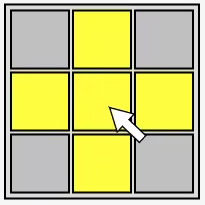
Light type
| Light | Description |
|---|---|
| Yellow light | A light that is on. |
| Gray light | A light that is off. |
| Black light | A broken light. Does not light up. Appears only in challenge mode. |
Game mode
| Mode | Description |
|---|---|
| 3 x 3 | It is 3 x 3 where the stage is randomized each time. |
| 4 x 4 | It is 4 x 4 where the stage is randomized each time. |
| 5 x 5 | It is 5 x 5 where the stage is randomized each time. |
| 6 x 6 | It is 6 x 6 where the stage is randomized each time. |
| CHALLENGE MODE | There are 50 fixed stages in total. Let's aim to clear in a few steps. |
| CLEAR SAVE DATA | Clear data such as step counts and clear counts. |
Method of operation
| Mouse | |
|---|---|
| Operation | Description |
| Left click | Move the cursor or press the light. Click again at the cursor position to select that item. |
| Right click | Open the menu if it can be opened. Otherwise, it will be cancelled. |
| Touch | |
| Operation | Description |
| Tap | Move the cursor or press the light. Touch again at the cursor position to select that item. |
| Long tap | Open the menu if it can be opened. Otherwise, it will be cancelled. ※ Not available on iOS. |
| Keyboard | |
| Operation | Description |
| Esc | Open the menu if it can be opened. Otherwise, it will be cancelled. |
| Enter | Select the item at the cursor position. |
| ↑ | Move the cursor up. |
| → | Move the cursor to the right. |
| ↓ | Move the cursor down. |
| ← | Move the cursor to the left. |
Save data
The game data are automatically saved in your browser.
Please note that the data will not lost when you close the tab or browser, but it will be shared if you open multiple tabs.
It is not shared with another browser or incognito (private) window.
If you want to clear the save data, you can do it from "CLEAR SAVE DATA".
Related sites
Related games
Feedback
If you have any requests, please feel free to contact us. If you find any problems or bugs, it would be helpful if you could contact us.